The best screen time apps for ADHD in 2026
The apps that fail here all fail the same way: they need you to configure them, start them, or remember them. Those are the three things ADHD makes hardest.
By Ruslan Shchuchkin, who built PhoneStop · · Read this page as Markdown
This is not medical advice, and no app treats ADHD. But the category has a design pattern that is a poor fit and one that is a good fit, and it is worth naming both.
Poor fit: apps built around planning. Sessions you start, profiles you configure, schedules you maintain. They work beautifully in the shop and are abandoned by Thursday. Good fit: apps that run by default, act on their own, and need one decision at install time.
Time blindness matters too. An app that shows you elapsed time only after the fact is a report card. An app that tells you where the day stands while you are in it is a prosthetic.
How we judged them
- Zero-setup by default. If it takes an afternoon, it will not survive.
- It runs without being started.
- It makes elapsed time visible in the moment, not in a weekly summary.
- The interruption is calm. Alarm-like nagging produces avoidance, then uninstallation.
- Escapable. Anything that traps you will be uninstalled the first time it traps you badly.
| App | Best for | Whole-phone limit | Warns before the limit | Platforms | Price | Try it |
|---|---|---|---|---|---|---|
| PhoneStop | Time blindness | Yes | Yes: 60/30/10 min left | Android | Free | Get it free |
| one sec | The automatic reach | No | No | iPhone, iPad, Android, browser extension | Free for one app; subscription to go further (around $50/year) | vs PhoneStop |
| ScreenZen | Free, and quick to set up | No | Only on app open | iPhone, iPad, Android | Free, donation-supported | vs PhoneStop |
| Forest | Body doubling a work block | No | No | iPhone, iPad, Android, browser extension | One-time purchase on iOS; free with in-app purchases on Android | vs PhoneStop |
| Digital Wellbeing | Bedtime, which is the hard one | No | No | Android (built in) | Free | vs PhoneStop |
| Brick | When you already know software will not hold | No | No | iPhone and Android (needs recent OS versions) | $59 one-time for the puck; the app is free | vs PhoneStop |
The list
1. PhoneStop: Time blindness
Android · Free
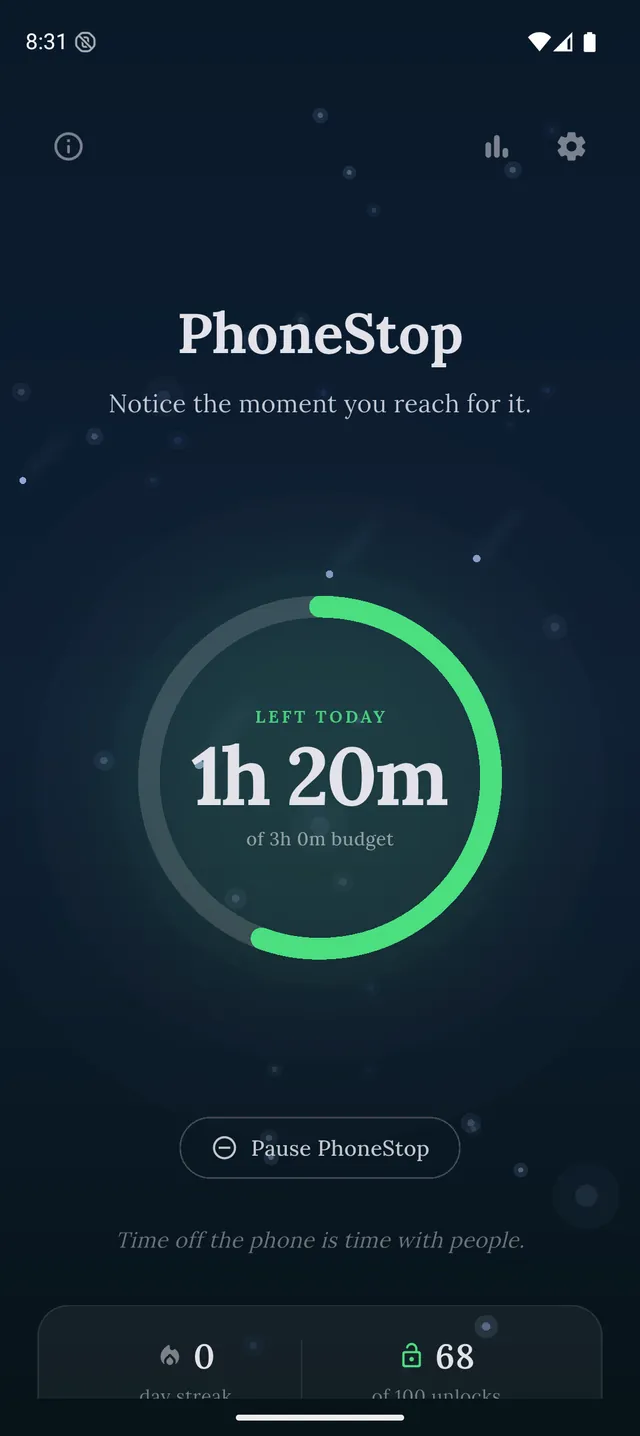
One decision at install: how many hours. After that it runs by itself and its whole job is making elapsed time visible before it is spent: a draining ring, then warnings at 60, 30 and 10 minutes left, then a full stop. It is designed to be calm rather than loud, and it is always escapable in one tap.
PhoneStop
30 minutes left
Half an hour of budget to go. A good moment to pick where it goes.
PAUSE
PhoneStop
Time's up
You are out of budget for today. Take a minute, then lock the phone.
PAUSE
Good: No configuration, no session to start, and the warnings arrive inside other apps.
Less good: Android only; it will not stop you opening a specific app.
2. one sec: The automatic reach
iPhone, iPad, Android, browser extension · Free for one app; subscription to go further (around $50/year)
Puts a few seconds between impulse and app. For hyperactive-impulsive patterns this is the highest-leverage second in the day, and it costs no planning.
Good: Acts at the exact moment of impulse.
Less good: iPhone setup uses Shortcuts, which is fiddly on a bad day.
Read the full PhoneStop vs one sec comparison
3. ScreenZen: Free, and quick to set up
iPhone, iPad, Android · Free, donation-supported
Ten minutes of setup, free, and the intention prompt does something useful here: it converts an automatic action into a conscious one for long enough to notice.
Good: Low setup debt, no cost, both platforms.
Less good: You have to maintain the app list.
Read the full PhoneStop vs ScreenZen comparison
4. Forest: Body doubling a work block
iPhone, iPad, Android, browser extension · One-time purchase on iOS; free with in-app purchases on Android
For the times you have decided to work and cannot start, an external timer with a small stake is genuinely useful, and Forest is the least joyless one.
Good: Motivating rather than punitive.
Less good: Only covers sessions you remember to start.
Read the full PhoneStop vs Forest comparison
5. Digital Wellbeing: Bedtime, which is the hard one
Android (built in) · Free
Bedtime mode and app timers cost nothing and are already installed. Revenge bedtime procrastination is common with ADHD, and a scheduled grey screen is a small, free nudge against it.
Good: Free, no install, no maintenance.
Less good: Dismissible, which is a genuine problem at 1am.
Read the full PhoneStop vs Digital Wellbeing comparison
6. Brick: When you already know software will not hold
iPhone and Android (needs recent OS versions) · $59 one-time for the puck; the app is free
If the pattern is that you defeat every app within a week, the physical version is worth the $59. Externalising the decision to an object in another room removes it from the moment entirely.
Good: Removes the negotiation.
Less good: One more object to lose, and a cost.
Read the full PhoneStop vs Brick comparison

The verdict
Pick the app that needs the least from you. PhoneStop on Android and one sec on either platform both work without a plan, and both are free to try. Avoid anything whose value depends on you configuring profiles this weekend, not because it is bad, but because it is asking for the one thing that is in short supply.
Disclosure: we make PhoneStop, so treat our own entry with the scepticism it deserves. Everything else here is written from public information and hands-on use; prices and platforms were checked in September 2026 and change often, so check the vendor before you pay.
PhoneStop is a free Android app. Set a daily screen time budget, get warned before it runs out, and get stopped when it does.

Android. No account, no ads. Your screen time never leaves your phone. An iPhone version is coming soon.
Questions people ask
Do screen time apps help with ADHD?
No app treats ADHD, and nothing here is medical advice. What some of them provide is an external cue for elapsed time, which is a common difficulty. Judge them on whether they still run in week three.
What is time blindness?
Difficulty sensing how much time has passed. In practice: intending to spend five minutes and losing ninety, without the interval registering. It is why a visible countdown works better than a report.
Why do I keep uninstalling these apps?
Usually because they trapped you once when you genuinely needed the phone. An intervention you can pass through honestly gets kept; one that punishes you gets deleted.