The best free screen time apps in 2026
"Free" in this category usually means a trial, an ad, or a free tier that covers a single app. These six are the exceptions.
By Ruslan Shchuchkin, who built PhoneStop · · Read this page as Markdown
This category has a pricing problem. A timer that shows you a number and greys out an icon is, at bottom, a small piece of software, and quite a lot of it is sold for $100 a year. There are good arguments for paying (someone has to maintain the thing), but you should not have to pay to find out whether the idea works for you.
Everything below is usable indefinitely without paying. Where there is a paid tier, we say what it holds back.
How we judged them
- Free forever, not a trial.
- The free tier has to do the actual job: one app is not enough.
- No ads inside the intervention. An advert on the screen telling you to stop looking at screens is a contradiction we ruled out.
- No account required, wherever possible.
| App | Best for | Whole-phone limit | Warns before the limit | Platforms | Price | Try it |
|---|---|---|---|---|---|---|
| PhoneStop | The whole phone, warned and stopped | Yes | Yes: 60/30/10 min left | Android | Free | Get it free |
| Digital Wellbeing | Costing nothing and being here already | No | No | Android (built in) | Free | vs PhoneStop |
| ScreenZen | A free pause before you open a named app | No | Only on app open | iPhone, iPad, Android | Free, donation-supported | vs PhoneStop |
| StayFree | Free tracking with real depth | No | Per-app alert | Android, iPhone, Chrome | Free with a premium tier | vs PhoneStop |
| Forest | Free focus sessions on Android | No | No | iPhone, iPad, Android, browser extension | One-time purchase on iOS; free with in-app purchases on Android | vs PhoneStop |
| Apple Screen Time | iPhone, free, already there | No | 5 min before, per app | iPhone, iPad, Mac (built in) | Free | vs PhoneStop |
The list
1. PhoneStop: The whole phone, warned and stopped
Android · Free
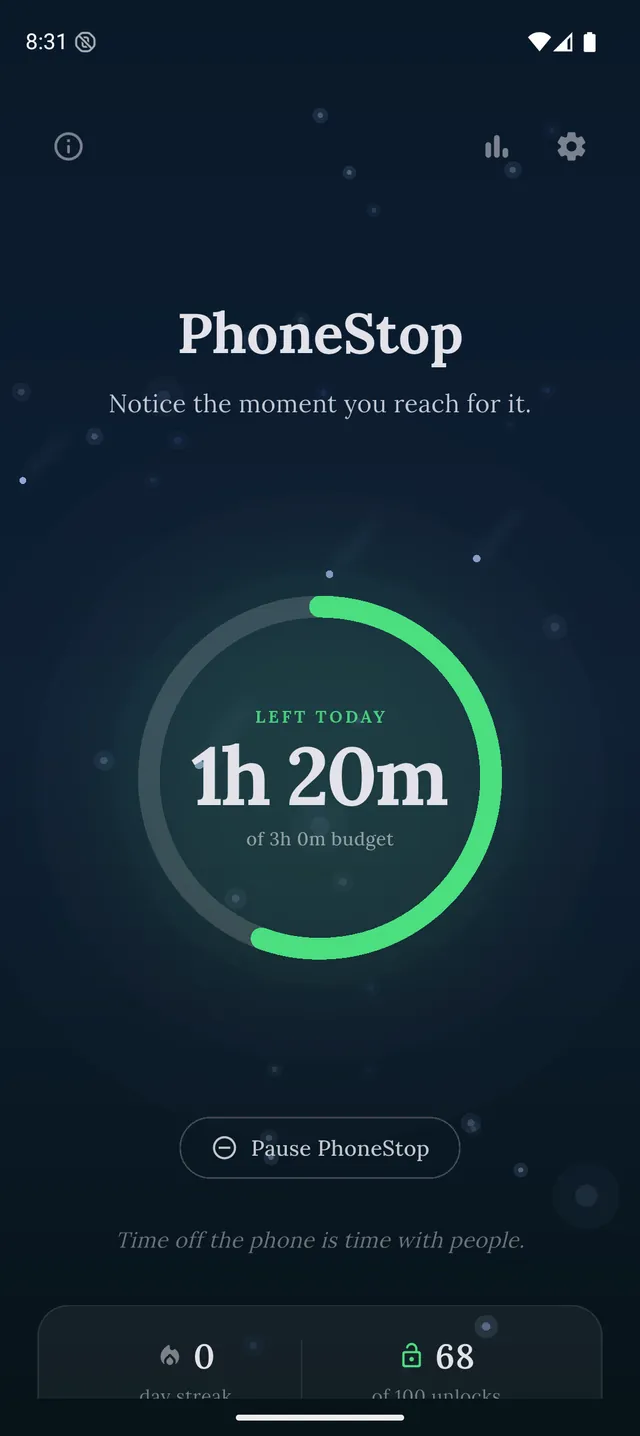
The only app on this list that counts the whole phone against one daily budget instead of app by app. That matters because blocking one app just moves the hour to the next surface (TikTok becomes Shorts becomes Reels), and a per-app limit never sees the move. Set the hours you want, and the ring on the home screen drains as you use the phone; warnings arrive at 60, 30 and 10 minutes left, inside whatever app you are in; at zero a full screen takes over: breathe or do twenty squats, then lock the phone in one tap. Free, no ads, no account, and your screen time never leaves your phone. An optional $9.99 Supporter upgrade adds an extra notification tone; every core feature stays free.
PhoneStop
30 minutes left
Half an hour of budget to go. A good moment to pick where it goes.
PAUSE
PhoneStop
Time's up
You are out of budget for today. Take a minute, then lock the phone.
PAUSE
Good: One budget for the whole phone, every core feature free, your screen time kept on the phone, nothing to configure.
Less good: Android only for now, and it will not block a single named app: that is the trade.
2. Digital Wellbeing: Costing nothing and being here already
Android (built in) · Free
Free, part of Android, no install. Weekly reports, app timers and bedtime mode. Its weakness is familiar: the timer is one you set and can lift yourself, and it is per app, not the whole phone. But as a free instrument for finding out the truth about your week it is hard to beat.
Good: Nothing to install or trust.
Less good: The limit is self-imposed and easy to lift, and it is per app, not per phone.
Read the full PhoneStop vs Digital Wellbeing comparison
3. ScreenZen: A free pause before you open a named app
iPhone, iPad, Android · Free, donation-supported
Donation-supported with no paid tier holding features hostage. A pause screen before the app opens, an intention prompt, and a limit on daily opens, on both Android and iPhone. Good at what it does, which is a single app at a time.
Good: Genuinely free, on both platforms.
Less good: Per app, so the phone as a whole is invisible to it, and the Android version wants an accessibility service.
Read the full PhoneStop vs ScreenZen comparison
4. StayFree: Free tracking with real depth
Android, iPhone, Chrome · Free with a premium tier
The free tier gives you per-app, per-day and per-week usage that is far more detailed than the built-in reports, plus basic limits.
Good: The best free numbers on Android.
Less good: Ads and a premium tier; blocking is soft.
Read the full PhoneStop vs StayFree comparison
5. Forest: Free focus sessions on Android
iPhone, iPad, Android, browser extension · One-time purchase on iOS; free with in-app purchases on Android
Free on Android with in-app purchases (it is a paid app on iPhone). Plant a tree, stay off the phone for the session, keep the tree.
Good: Free where most people need it, and pleasant enough to keep using.
Less good: Only guards sessions you start yourself.
Read the full PhoneStop vs Forest comparison
6. Apple Screen Time: iPhone, free, already there
iPhone, iPad, Mac (built in) · Free
The iPhone equivalent of starting with Digital Wellbeing: app limits, categories, Downtime, and a five-minute warning before the block. Then an Ignore Limit button.
Good: Free, deeply integrated, and the category system is better than any third-party list.
Less good: Ignore Limit is right there.
Read the full PhoneStop vs Apple Screen Time comparison

The verdict
If the number that scares you is the total (hours on the phone, not on one app), the free answer is PhoneStop on Android: one budget for the whole day, and a real stop when it runs out. Want to see that number first? Spend a week with the tool already on your phone (Digital Wellbeing on Android or Apple Screen Time on iPhone) purely to get an honest count. And if it is genuinely one or two apps doing the damage, ScreenZen puts a free pause in front of them. None of that costs anything, and if it works you have saved yourself a $100 subscription.
Disclosure: we make PhoneStop, so treat our own entry with the scepticism it deserves. Everything else here is written from public information and hands-on use; prices and platforms were checked in September 2026 and change often, so check the vendor before you pay.
PhoneStop is a free Android app. Set a daily screen time budget, get warned before it runs out, and get stopped when it does.

Android. No account, no ads. Your screen time never leaves your phone. An iPhone version is coming soon.
Questions people ask
Is there a completely free app blocker?
ScreenZen is free and donation-supported. AppBlock has a free tier that blocks a limited number of apps. PhoneStop is free but budgets rather than blocks.
Why are screen time apps so expensive?
Because the market will bear it: people looking for one usually want it badly. That does not mean the software is expensive to build, and the free options here are proof.
Are free screen time apps selling my data?
Some free apps in adjacent categories do. Check what the app asks for and what its privacy policy says it sends. PhoneStop never sends your screen time: it sends only anonymous taps, which you can turn off, and its privacy policy names every one.